Rich Phifer
Firefly · architecture & cross-cutting · second-brain workflows
I split my time roughly in half between Firefly engineering and architecture / cross-cutting work — talking to product managers, engineering managers, and other staff engineers. The AI tooling I lean on looks pretty different across those two halves, so this writeup splits the same way.
Firefly dev: ADESA Workflow, with experimentation as a feature
For the past month or so the Firefly team has been heavily using the ADESA Workflow plugin — that’s our team’s chosen flow, same family as Sith Happens (the team) and Avengers. We run it out of a centralized planning repo and use it to plan, implement, and (increasingly) PR + QA into our other repos.
We landed there after a long stretch of experimenting with other plugins — Essentials, GSD, GSD2, and Superpowers — and we still treat the choice as live. Constant questioning of and tinkering with the flow is part of how the team works; we expect the surface area to keep shifting as /aw-pr and /aw-verify mature.
When I’m actually in code (less often than the other champions), my dev MCPs are short:
- Azure DevOps — work-item context.
- Playwright — browser automation for end-to-end checks.
I’ve been deliberately migrating off MCPs and toward CLIs for the rest:
azfor Azure operationsghfor GitHub
CLIs end up being faster, more scriptable, and easier to compose into one-off commands than the equivalent MCP in most of my dev work.
The validate side of RPIV: a harness, not just a skill
The other piece of dev work I’ve been pushing on is the validate step of RPIV. For a long stretch of last year I had a Claude Code “QA skill” that injected AI into the manual QA pass to make it more comprehensive and consistent. That has since grown into a harness wrapped around Claude Code (CVNA-Wholesale-SANDBOX/firefly-harness) that the Firefly team uses as part of daily work. Claude Code is still doing the actual reading, reasoning, and tool-calling — the harness is the surface that makes it usable as a daily QA workflow instead of a one-shot prompt.
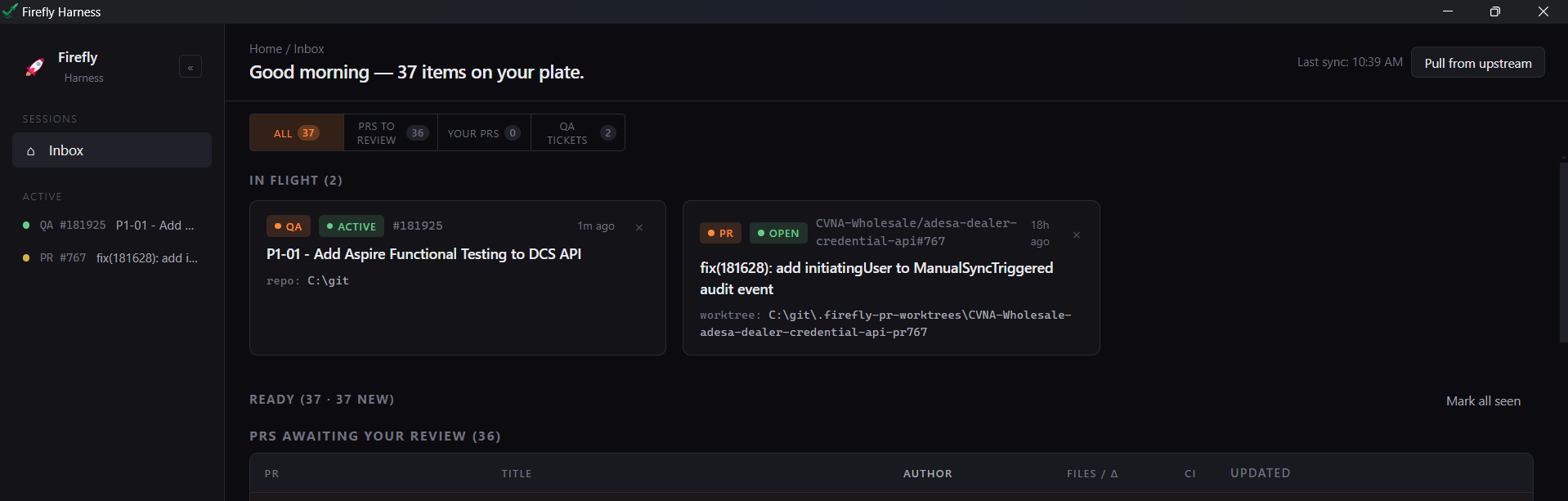
The inbox is the at-a-glance view — what PRs might need my attention, what stories are in QA, what’s already in flight:
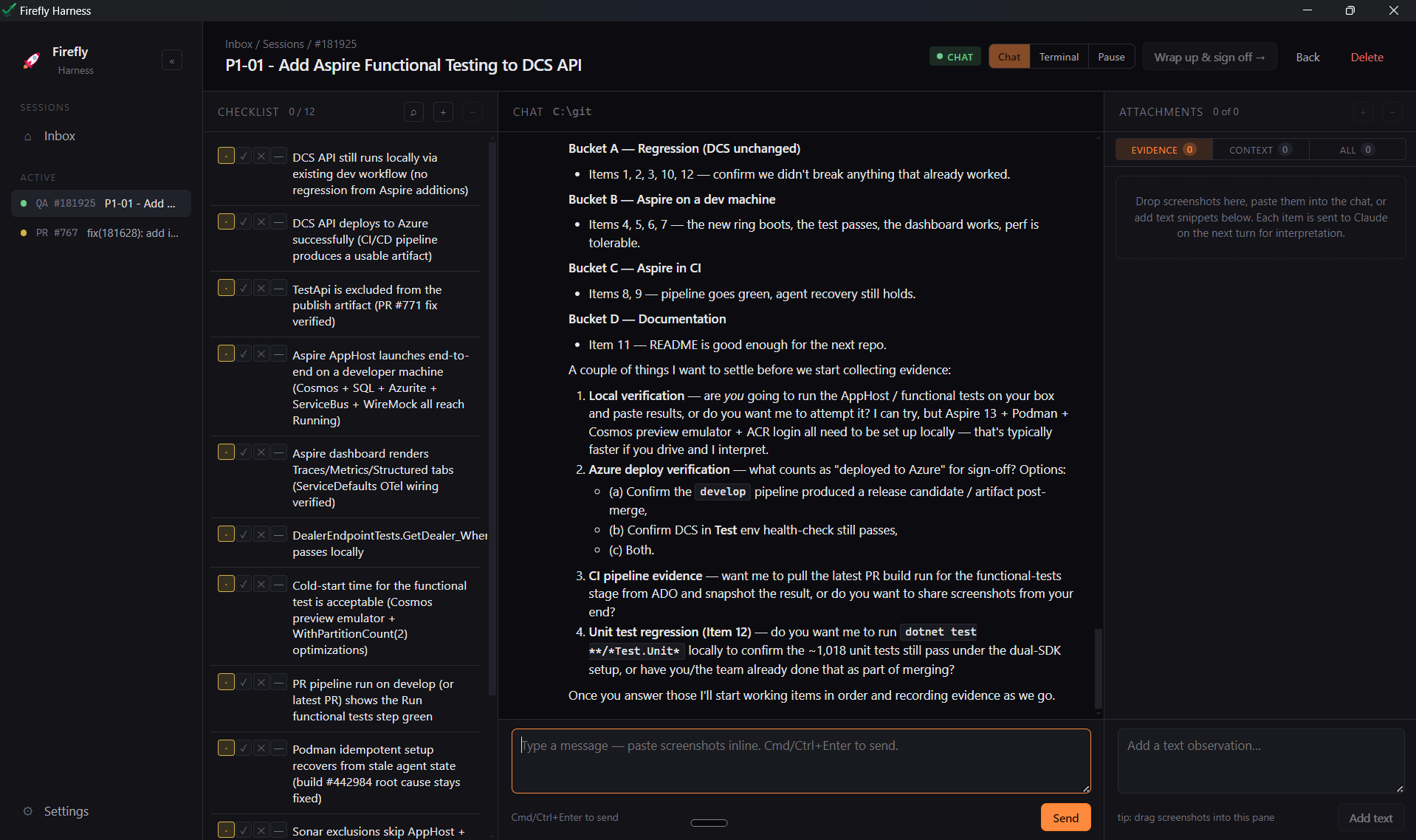
Once I commit to picking something up, the session view facilitates the QA pass itself: a checklist on the left, a Claude Code chat in the middle, and an evidence/context pane on the right. Each item gets driven and documented in one place rather than scattered across PR comments, ADO, and Slack:
Process feedback feeds back in over time so the harness keeps getting sharper. Harness engineering is something I think a lot about right now and I suspect most engineers are too — the leverage is real, and it’s where a lot of the next round of AI-in-engineering ROI is going to come from.
Architecture / cross-cutting: a second brain Claude Code can read
The other ~50% of my time is conversations — product, engineering, staff peers. Claude Code is the agent doing the work here too; I just point it at a different surface than code. The value is less about generating code and more about synthesizing, keeping track of open questions, and being a good thought partner. The setup:
- Obsidian as the second brain — Claude Code runs in the vault directory and reads/writes notes the same way it reads/writes source files.
- Granola transcribes every meeting and dumps the markdown straight into the Obsidian vault automatically, so the meeting context is just there for Claude Code to pick up.
- Google Drive MCP gives Claude Code access to email and calendar.
- Slack MCP gives Claude Code access to Slack DMs and channels.
- I keep dumping thoughts into Obsidian throughout the day so Claude Code has the running context, not just the meeting outputs.
On top of that I built a morning brief Claude Code skill I run every morning. It walks the previous day across:
- ADO items
- pull requests
- Slack (channels + DMs)
- calendar
…and pulls it together into a picture of where things are. I then use Claude Code as a thought partner to decide where my focus blocks should go, and to produce a daily brain-dump of what’s on my mind and on my plate.
The combination — automatic transcript capture + persistent vault + the morning brief skill + Claude Code as the agent on top — is what makes it actually work as a thought partner instead of a chatbot you have to re-context every session.
Dictation is a game-changer
Two non-Claude tools that I think are genuinely outsized for this kind of work:
- Wispr Flow for dictation — I’m dictating this right now. A good dictation tool changes the rhythm of working with Claude Code as a thought partner; the friction of typing out a brain-dump goes away.
- Granola for meetings — especially with the plugin path that writes the markdown out to wherever Claude Code already works (Obsidian, in my case). The transcript becomes part of the agent’s context with no manual handoff.
If you’re trying to use Claude Code as a thought partner and not just a code generator, both of these are worth the spend.